



How to Install Demon Slayer -Kimetsu no Yaiba- The Hinokami Chronicles 2 (Build 24561262) on Windows 10/11 PC & macOS Desktop – Full Setup Guide
PC
23 GB
Published on, Oct 25, 2026
Last Updated - Nov 26, 2026 [Build 24561262]
Build 24561262
Latest
Step-by-step installation guide for Demon Slayer -Kimetsu no Yaiba- The Hinokami Chronicles 2 (Build 24561262) on Windows 10/11 PC & macOS Desktop. Learn how to unpack, verify permissions, apply updates, and launch without errors.
Release Group
/
Clean Pre-pack
Join Discord
Support the developers by purchasing the game
Get it on Steam
How to Install Demon Slayer -Kimetsu no Yaiba- The Hinokami Chronicles 2 (Build 24561262) on Windows 10/11 PC & macOS Desktop – Full Setup Guide Free Download - Game Review
How to Install Demon Slayer -Kimetsu no Yaiba- The Hinokami Chronicles 2 (Build 24561262): Download the full desktop archive from the verified mirror below, extract the files to a clean directory using 7-Zip, WinRAR, or Keka, install any bundled runtime dependencies, and launch with administrator privileges.
Step-by-Step Desktop Installation Checklist for Demon Slayer -Kimetsu no Yaiba- The Hinokami Chronicles 2
- Download Complete Release: Visit the Demon Slayer -Kimetsu no Yaiba- The Hinokami Chronicles 2 main download page and grab the full archive using IDM, JDownloader 2, or Free Download Manager.
- Prepare Security Exclusion: Add your destination folder to Windows Security exclusions (or clear Gatekeeper quarantine via
xattr -cron macOS) so false-positive heuristics do not block offline activation files. - Unpack Archive: Right-click the downloaded archive and extract using 7-Zip or WinRAR. Avoid extracting inside
C:\Program Filesor cloud-synced OneDrive folders. - Verify Runtime Dependencies: Install Visual C++ 2015–2022 Redistributables and DirectX on Windows if present in
_CommonRedist. - First Launch: Right-click the main executable and select Run as administrator.
More Demon Slayer -Kimetsu no Yaiba- The Hinokami Chronicles 2 Resources: System Requirements | Crash & Error Fixes | Patch Notes
Demon Slayer -Kimetsu no Yaiba- The Hinokami Chronicles 2 – Windows 10/11 & macOS Configuration, Preset & Save Data Paths
When backing up user profiles, presets, or local save data between a Windows Desktop workstation and a MacBook Pro/Studio for Demon Slayer -Kimetsu no Yaiba- The Hinokami Chronicles 2 (Build 24561262), check these default desktop directories:
| Desktop Platform | Default User Data / Config / Preset Directory | Backup & Migration Notes |
|---|---|---|
| Windows 10 / 11 (x64) | %APPDATA%\{Demon_Slayer_-Kimetsu_no_Yaiba-_The_Hinokami_Chronicles_2}\ or %USERPROFILE%\AppData\LocalLow\{Demon_Slayer_-Kimetsu_no_Yaiba-_The_Hinokami_Chronicles_2}\ | Back up this folder before installing a newer version or resetting preferences. |
| macOS (Apple Silicon M1–M4 / Intel) | ~/Library/Application Support/Demon_Slayer_-Kimetsu_no_Yaiba-_The_Hinokami_Chronicles_2/ & ~/Library/Preferences/ | Use Cmd + Shift + G in Finder to open hidden Library paths directly. |
Release Metadata Summary – Demon Slayer -Kimetsu no Yaiba- The Hinokami Chronicles 2
- Title / Package: Demon Slayer -Kimetsu no Yaiba- The Hinokami Chronicles 2
- Verified Build Version: Build 24561262
- Archive Size: 23 GB
- Category: GameApplication, Anime
- Target Desktop OS: Windows 10/11 (64-bit) & macOS Desktop (Apple Silicon M1/M2/M3/M4 & Intel)
- Primary Download Hub: Download Demon Slayer -Kimetsu no Yaiba- The Hinokami Chronicles 2 (Build 24561262) Full Desktop Build
Frequently Asked Questions – Demon Slayer -Kimetsu no Yaiba- The Hinokami Chronicles 2 (Build 24561262)
Is Demon Slayer -Kimetsu no Yaiba- The Hinokami Chronicles 2 free to download?
Yes. The pre-installed Build 24561262 package is available as a free download on this page, listed at 23 GB for Windows, Android, and iOS.
What version is the current download?
The current download is Build 24561262, which matches the latest Steam build. The content package was last updated on October 21, 2026.
How much storage do I need?
The download itself is 23 GB, and the game requires 30 GB of available space to install and run comfortably.
Why does the game show a 'Failed to create save data' error?
This is usually a folder permission issue. Run the game as administrator and install it outside protected system directories. Extracting into an antivirus-excluded folder also helps.
Does it support controllers and Steam Deck?
Yes. The game is Steam Deck Verified and includes full controller support.
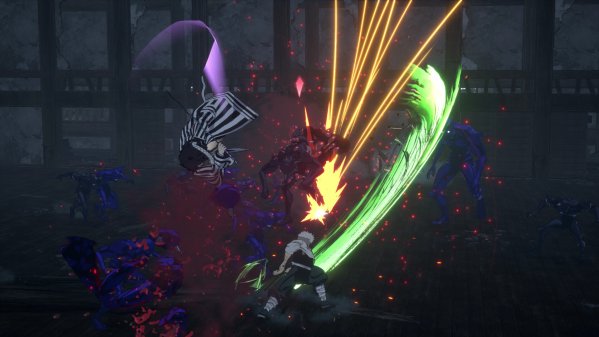
Game Screenshots Gallery


Installation Guide
Step-by-step setup process
1
Game is pre-installed / portable, therefore you do not need to install the game.
2
Just extract the rar / zip file using 7-Zip or WinRAR.
3
Simply launch the game directly from the game executable as Administrator.
Important Notes
- Install necessary apps from Redist or _CommonRedist to ensure game launches without problems.
- Always extract game in Antivirus / Defender excluded folder to prevent false-positive file quarantine.
- Always run the game as administrator.
System Requirements
Minimum specifications needed
Requires a 64-bit processor and operating system
OS
Windows 10 / 11 64-bit
Processor
Intel Core i5-2500K / AMD FX-6300
Memory
8 GB RAM
Graphics
NVIDIA GeForce GTX 660 / AMD Radeon HD 7870
Storage
23 GB
Related GameApplication Games — Recommended For You
 V 1.2.3
Action
Jotunnslayer Hordes Of Hel
2024 • 14.3 GB
 V 2.2.2
Action
Demonologist
2023 • 37.2 GB
 V 260629
Action
Demon Lord Just A Block
2026 • 0.41 GB
 V 1.0.38
Adventure
Sex Pop Demon Hunters
2026 • 2.7 GB

Game
Skul The Hero Slayer
2026 • 1.6 GB
 V 1.83
Anime
Demon Slayer -Kimetsu no Yaiba- The Hinokami Chronicles
2026 • 24 GB
Game
Register
2026

Guides
eSport System Requirements, Specs & Compatibility (2026)
2026 • 0 mb
Links Online & Tested
Download How to Install Demon Slayer -Kimetsu no Yaiba- The Hinokami Chronicles 2 (Build 24561262) on Windows 10/11 PC & macOS Desktop – Full Setup Guide
Pre-installed direct download links, no installer or license keys needed.
Total File Size
23 GB
Join the discussion
Share your thoughts and feedback
No comments yet. Be the first to share your thoughts!